
Nintendo has rolled out system update version 20.0.0 for the Switch family of systems, introducing major new features like Virtual Game Cards, GameShare for Switch 2 titles, and improved system transfer options ahead of the new console’s launch.
Here’s a full breakdown of what’s included:
Ver. 20.0.0 Highlights (Released April 29, 2025)
Virtual Game Card – New HOME Menu Icon
- Digital purchases, ncluding full games, DLC, and select free titles, and now appear as virtual game cards in a new dedicated menu.
- These cards can be virtually loaded or ejected across up to two Nintendo Switch systems.
- Family group members linked to the same Nintendo Account can borrow virtual game cards.
- See the Virtual Game Card Guide for more.
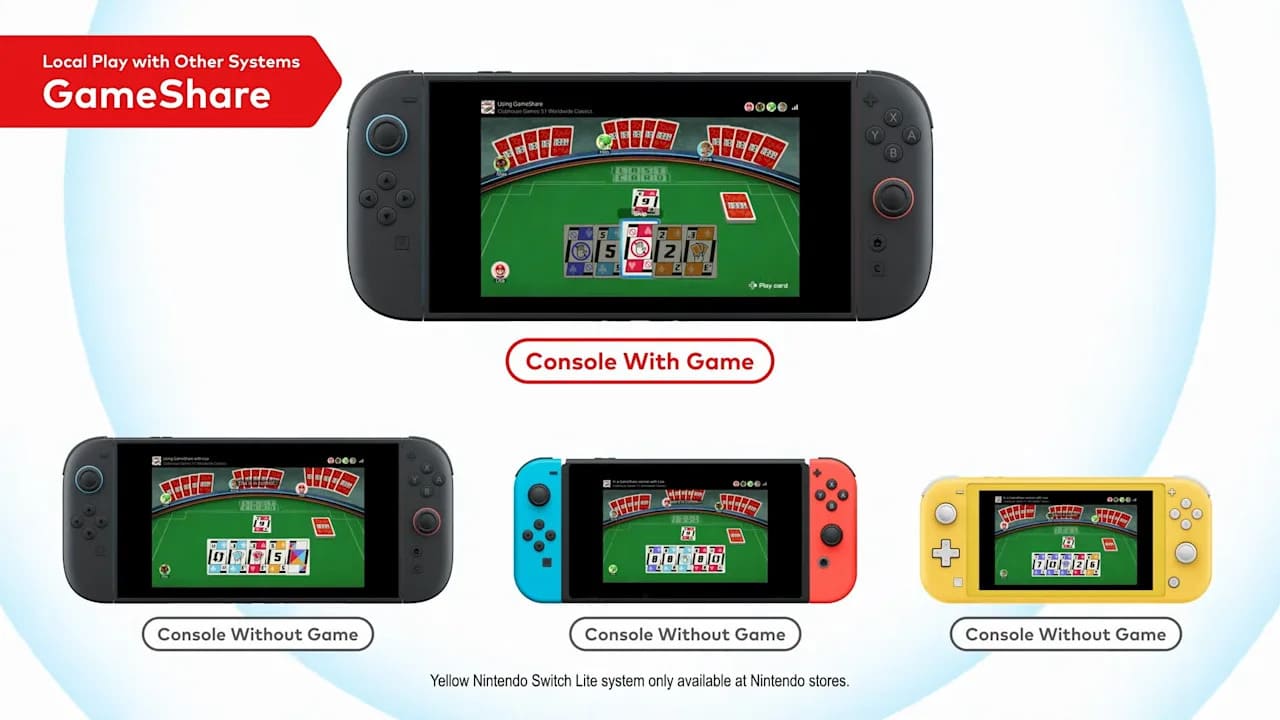
GameShare (Nintendo Switch 2 Exclusive)
- Switch 2 systems can now share compatible games via local wireless play.
- Only the Switch 2 can initiate GameShare, and it doesn’t work between standard Switch, OLED, or Lite models.
New User Settings
- User-Verification Settings let you protect the Virtual Game Card menu with a PIN or Nintendo Account login.
- Online License Settings allows users to launch downloaded software and DLC while connected online, without loading the associated virtual game card.
Expanded Save and System Transfer Options
- Multiple save files can now be transferred at once via the Transfer Your Save Data menu.
- A new System Transfer to Nintendo Switch 2 option has been added:
- Local transfers allow data migration between an original Switch and a Switch 2.
- For those losing access to their original system before receiving a Switch 2, a server-based transfer option is available. This will upload your data to a Nintendo server and then factory-reset the original system.
- Nintendo recommends using local transfer when possible.
- Both methods require an internet connection and a Nintendo Account.
UI Tweaks
- The Nintendo eShop and Nintendo Switch News icons have received updated color schemes.
- Several user icons have been visually refreshed.
More details on these features and the Nintendo Switch 2 are available on the official Nintendo website.