

Google recently rolled out new Gemini-powered “smart features” in Gmail and Google Workspace that are on by default and use your emails, chats, and attachments to train their AI models. Yes, even your private conversations. They say the data is anonymized and no human reads it, but it’s still your data being fed into the machine. If that bothers you (and it should), here’s exactly how to shut it off in under 60 seconds.
What Actually Changed?
In 2025, Google started enabling these features automatically for most accounts:• Smart Compose
• Smart Reply
• Summaries
• Gemini-powered search
• “Help me write” in Gmail/Chat/Meet/Docs
They pull from your entire history to make suggestions and improve the models. Google claims everything is anonyminized and aggregated before training (their own privacy notice + Forbes article from Nov 17 2025), but once your data leaves your inbox for training, you no longer control it. Bottom line: convenience on, privacy off (unless you flip the switches yourself).

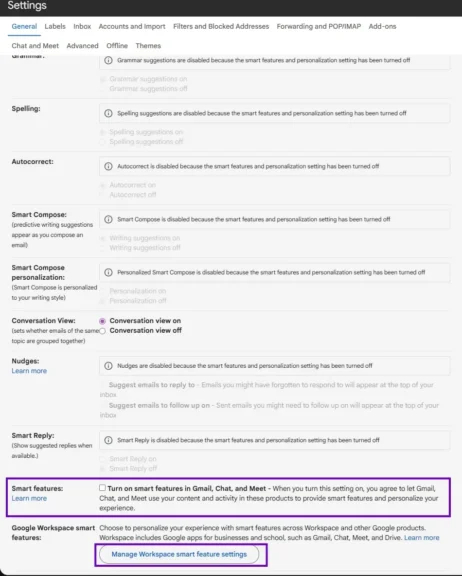
- Step 1: Click/Tap the gear icon in your Gmail
- Step 2: Go to the ‘General’ tab and remove the checkbox on Smart Features, then select the outlined box
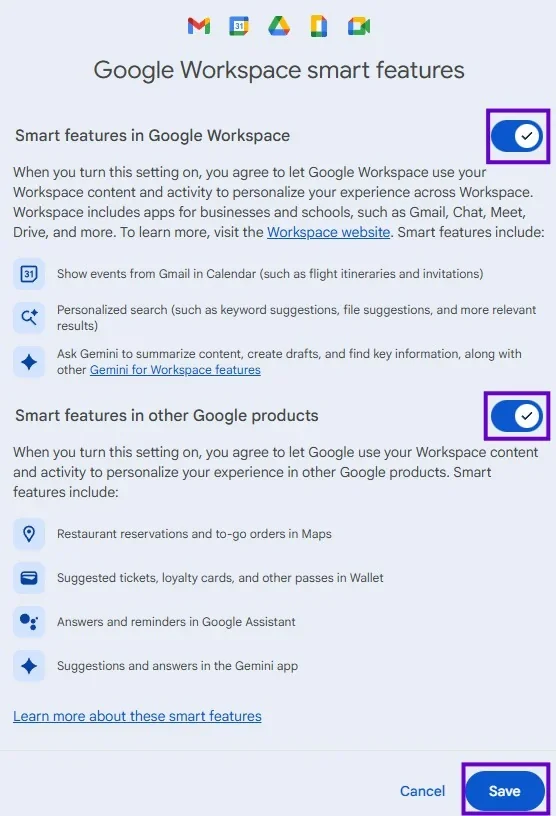
- Step 3: Untick both options in Google Workspace smart features, then save the settings.
Done. Google can no longer use your Gmail data for AI training.(Pro tip: do this on desktop. Mobile sometimes hides the second set of options.)
The Trade-Off
You’ll lose:
- Smart Reply / Smart Compose suggestions
- Some auto-categorization
- Gemini summaries in search
I’ve had them off for months. I don’t miss them at all. Inbox feels exactly the same, just mine.
Better Alternatives If You’re Ready to Leave Gmail
If this is your final straw, these are the only two I actually recommend and use myself:
Service | Free Storage | Encryption | Paid Starts At | Best For |
|---|---|---|---|---|
1GB | End-to-End Zero-knowledge | €3/month | Open-Source Fans | |
1GB | End-to-end Zero-knowledge | €4.99/month | Swiss privacy laws VPN bundle |
Both are ad-free, never scan your mail, and actually respect you. They both have one-click Gmail importers, so switching isn’t the weekend project it used to be.
Editor’s Take
As more websites are wanting to harvest your data for AI or other monetary purposes, it has never been a better time to become more aware of who and what you are sharing your data with and how it is used. For email alternatives that offer a more privacy centric experience, Tuta and Protonmail are popular free alternatives with higher paid tiers if you’d like to support them. Both of these use end-to-end encryption offering a level of privacy and security that Google and other free services do not offer.